
Issue routing
Create a ticket per finding, automatically or by hand.
A finding that lives only in Interopt is easy to forget. Routing files it in the tracker your team already works in.
Automatic, from a scan
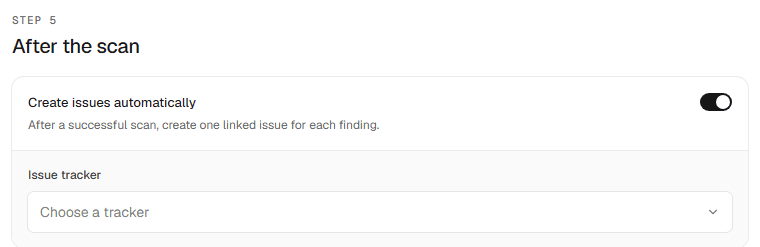
In the New scan form's After the scan step, turn on Create issues automatically and pick a tracker. After a successful scan, Interopt creates one linked issue for each finding. On a recurring scan the same applies to every scheduled run.
The destination is resolved and frozen when the scan is created, so changing the workspace default later cannot silently reroute the findings of a run that already happened.
What gets created depends on the tracker:
- GitHub — an issue in the matching repository. A public repository needs an explicit opt-in, because the title and details become publicly visible.
- GitLab — a confidential issue, visible only to authorized project members.
- Jira — an issue in the default project, labelled with the severity.
- Linear — an issue in the default team, with priority mapped from severity.
- Datadog — a Work Management work item.
- ServiceNow — a standard incident.
Each tracker needs a default project, team, or repository chosen in Settings → Integrations first.
By hand, from a finding
On a finding, Push to creates the same issue for that one finding, with a picker for the destination. A finding holds one link per tracker, so it can be pushed to a second tracker later without creating a duplicate.
Status comes back
A linked issue's state is read from the tracker and shown on the finding as one of four categories: to do, in progress, done, or cancelled. It refreshes in the background, and Sync status forces a refresh.
When a retest resolves a finding, its linked tickets are closed too. See Retesting.
Unlinking removes the link only — the ticket itself is never touched. Filter the findings list by Issue tracking → No linked issue to find work that has not been filed anywhere.